Enterprise AI: Agentic Marketing Platform
End-to-end product design for an agentic marketing platform that helps enterprise marketers move from intent to execution, pairing a visual canvas with a proactive AI assistant that drafts briefs, reviews proposals, and carries campaigns forward.
Role & Scope
I owned the end-to-end UX design for an agentic marketing platform (AMP) built on top of Adobe Workfront. The work spanned discovery through high-fidelity design and detailed UX documentation, covering user flows, wireframes, polished visual designs, and a component-level spec for the platform's conversational UI. I partnered closely with CX&I, product, and engineering teams, serving as the bridge between early discovery and visual execution — translating ambiguous, fast-moving requirements into a coherent product vision. The platform was in active development and had not been publicly released.
Process overview
Understanding the Workflow Problem
Defining the Canvas + Chat Model
Designing the Core Marketer Flows
Onboarding & Personalization
Campaign Creation & Review
Asset Reuse & Compliance
High-Fidelity Design
UX Documentation
Understanding the Workflow Problem
Enterprise marketing teams operate at enormous scale, and the path that takes a campaign from idea to launch is anything but simple. Marketers juggle briefs, agency proposals, creative reviews, asset reuse, and layers of regulatory approval — often across multiple tools, markets, and stakeholders.
The friction that slows them down usually has nothing to do with the creative work itself. Briefs are time-consuming to write and easy to leave incomplete. Agency proposals need to be checked against cost and scope benchmarks, but that context is scattered. Creative concepts have to be validated against the brief, brand standards, and compliance rules. And reusing an existing asset in a new market means navigating a maze of localization and regulatory requirements.
Each of these steps is a place where campaigns stall. The opportunity was to design an experience where an intelligent agent could reduce that friction, not by replacing the marketer's judgment, but by doing the legwork and bringing decisions to them.
Defining the Canvas + Chat Model
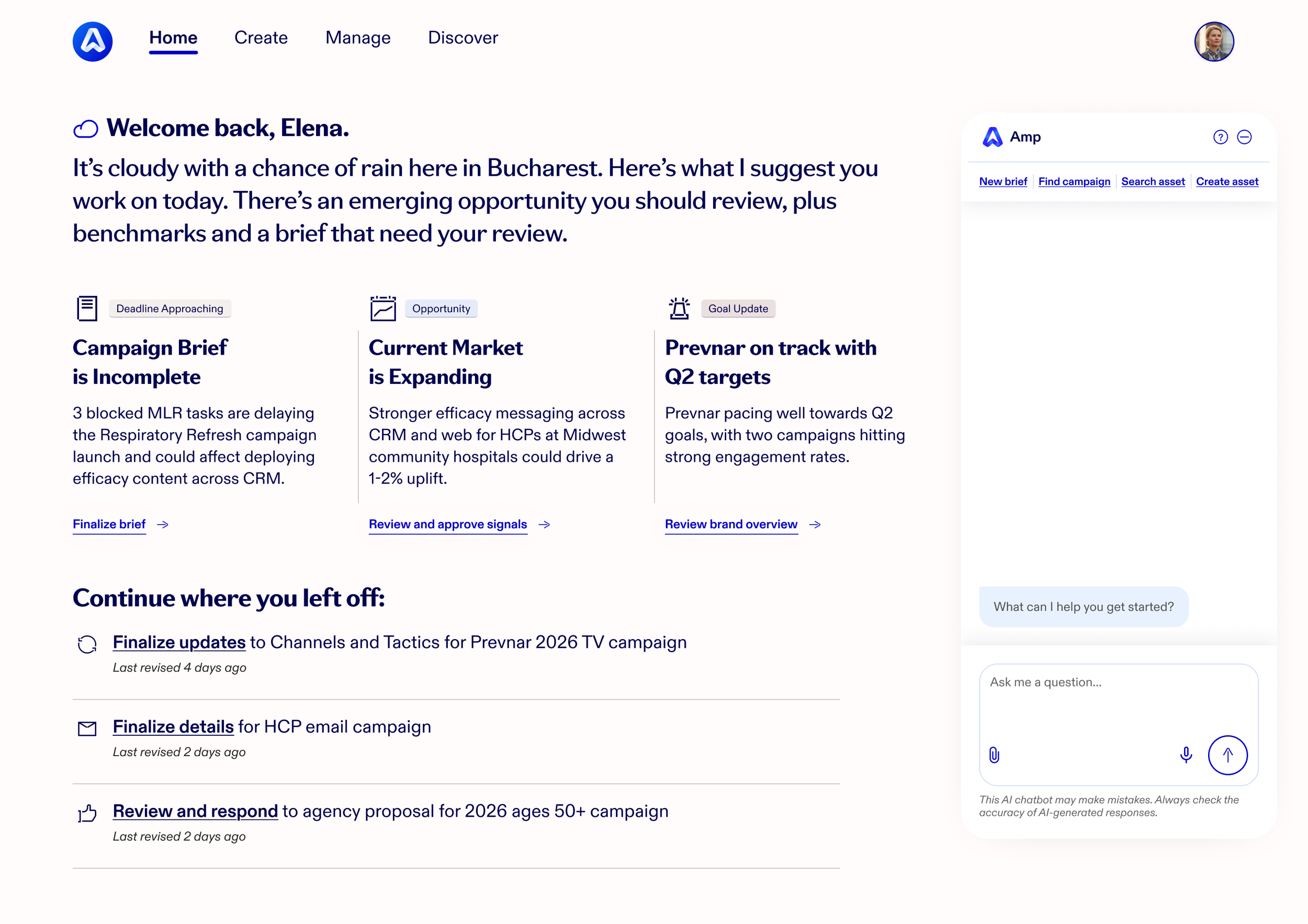
The central design decision was a dual-surface interface: a canvas where work takes shape visually, paired with an AI chat window where the marketer converses with the agent.
This let marketers work the way that suited the moment. They could type a request in natural language, or select and edit directly on the canvas. The agent narrated what it was doing, asked clarifying questions, and updated the canvas in real time as decisions were made. When the marketer needed more room, the chat could be minimized to give the canvas space to breathe.
This paradigm carried across every flow in the product, giving marketers a single, consistent mental model no matter which task they were doing. Establishing it early was what let the rest of the flows stay coherent as the product grew in scope.
Designing the Core Marketer Flows
With the canvas + chat model established, the team identified the flows that mattered most — the ones a marketer relies on to actually get a campaign out the door. Rather than trying to design the entire platform at once, we focused on working through these core experiences end to end: onboarding, campaign creation and review, and cross-market asset reuse. Together they represent the spine of a marketer's day, from setting up their workspace to shipping compliant creative.
Onboarding & Personalization
A first-time marketer signs in with their company credentials and is met by the AMP Companion, which walks them through setup conversationally rather than dropping them into a blank form.
Several decisions shaped how onboarding came together:
Pre-populated profile. AMP pulled the marketer’s role, therapeutic areas, and brands from existing HR data, then asked them to review and confirm. This validated their profile in seconds rather than asking them to build it from scratch. I designed the profile confirmation screen to make editing effortless, with dedicated patterns for adding a role, a market location, and a language.
Exploring the edit interactions. Some of these details required real exploration. For adding a role, for example, I worked through multiple versions: one that added roles a single entry at a time and one that supported adding several at once. I annotated open questions and assumptions directly in the file to keep product and engineering aligned on what still needed resolving.
Conversational preferences. The agent learned the marketer's preferred communication style and notification settings through natural conversation, pre-populated with recommendations and editable at any time.
Suggested metrics. Most importantly, AMP proactively suggested the brand KPIs, target populations, and marketing-mix metrics worth tracking based on the marketer's role — so the workspace felt tailored from the first session.
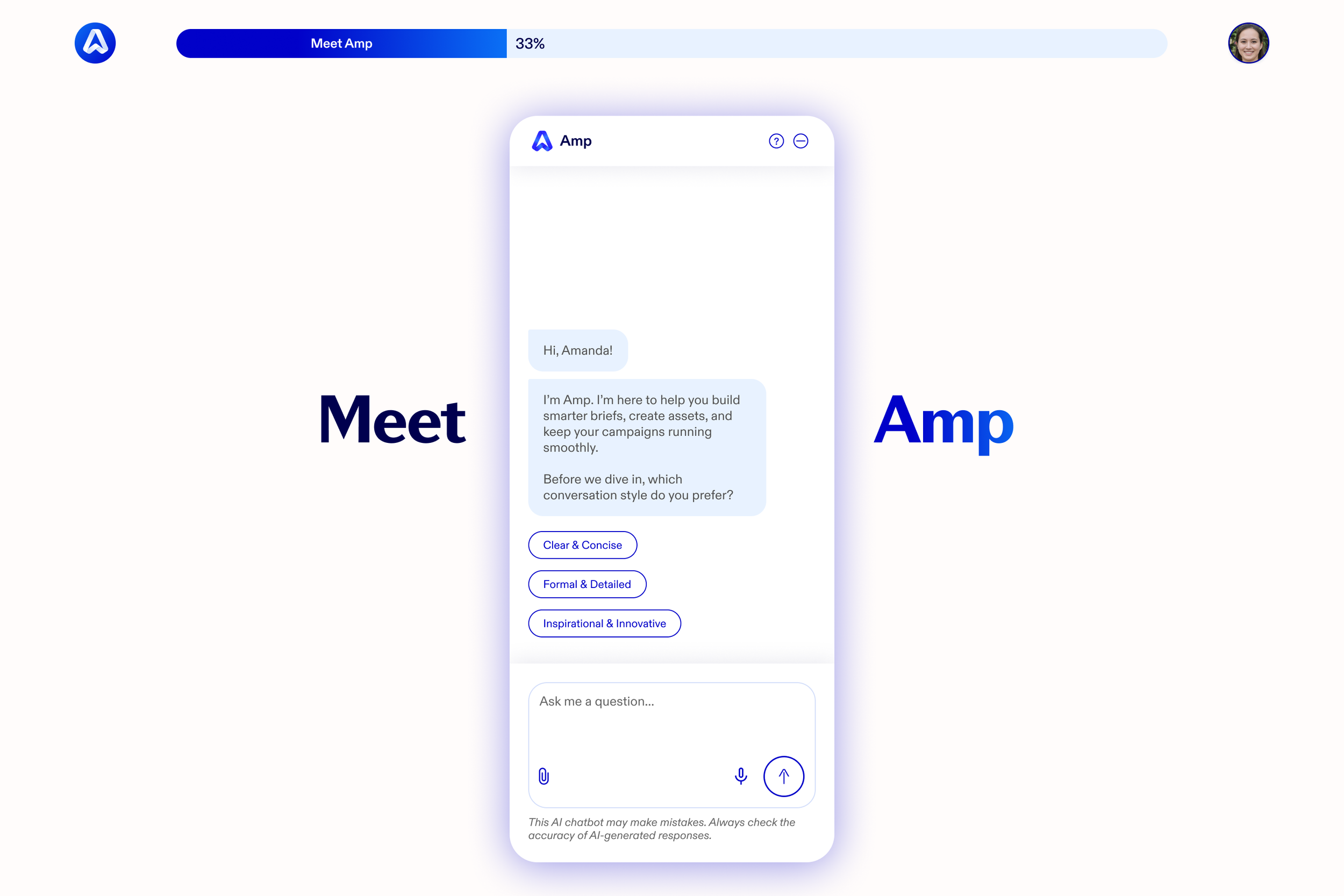
Onboarding closed with a guided tour of the landing page, where a progress bar tracked setup and help bubbles introduced key sections one at a time through the chat. The goal was to make the marketer feel known immediately, and to have the platform feel useful before they'd done any work.

Campaign Creation & Review
The core of the product was a connected set of flows covering the campaign lifecycle. Each one leaned on the same principle: the agent does the heavy lifting, but the marketer always sees what it's doing and stays in control.
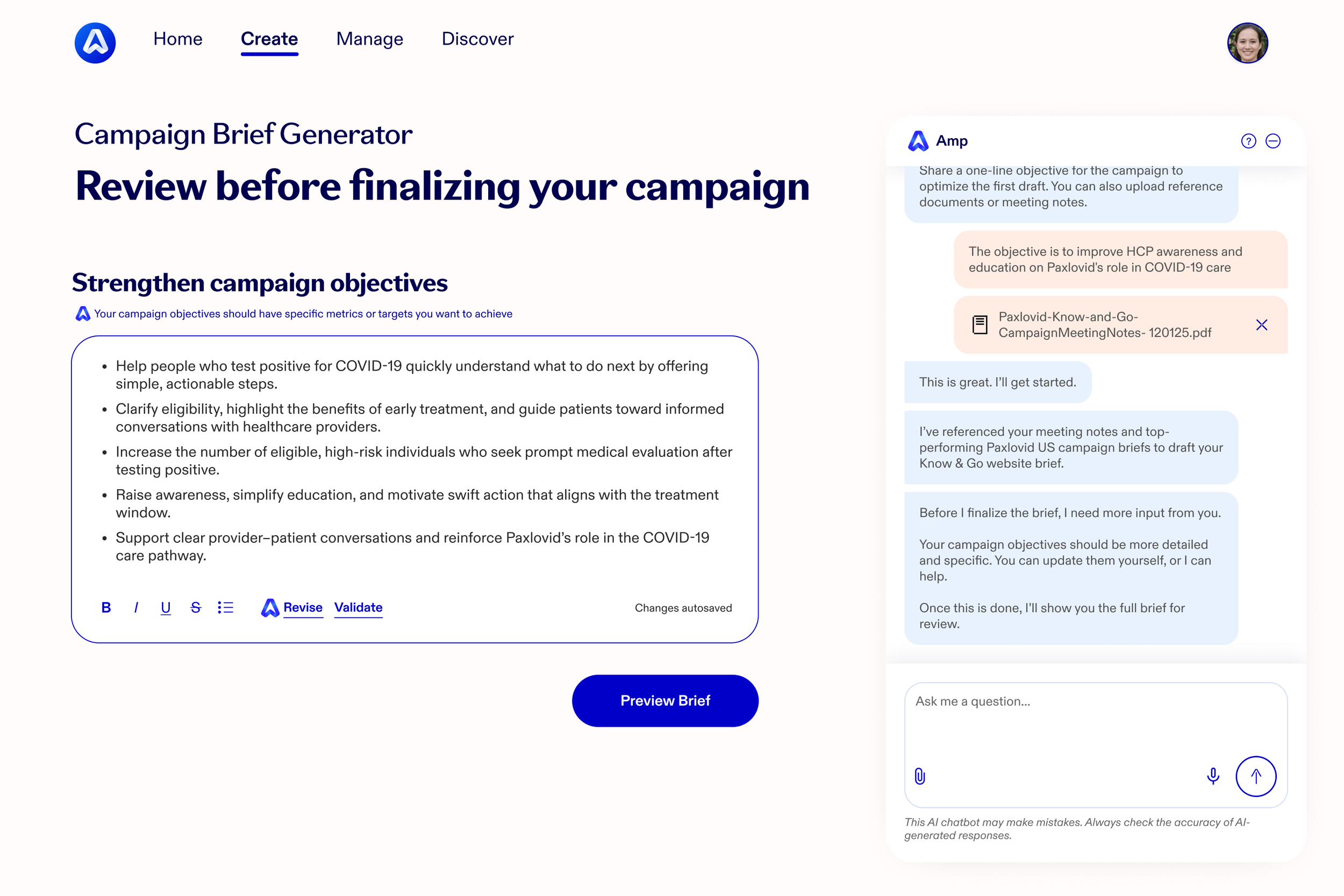
Creating a brief from a prompt. Writing a brief is one of the most time-consuming steps in the lifecycle, so AMP compressed it. The marketer describes what they need in a single line of natural language. AMP asks clarifying questions, references their profile and past projects to infer details, and proactively fills gaps to produce a comprehensive first draft. As it generates the brief, it exposes the steps it's taking rather than hiding the work behind a spinner. It even recognizes when a request aligns with an existing initiative and offers to structure it as a supplemental project rather than a standalone campaign.
Reviewing an agency proposal. When an agency submits a proposal, the marketer receives an alert with an AMP-generated summary: key costs, a comparison against benchmarks from similar past projects, and flagged deviations, risks, and opportunities. Instead of manually cross-referencing scattered data, they review the proposal alongside the agent's analysis — for example, that a timeline runs longer than typical for the scope, or that shared assets could be reused to cut cost. From there they can approve or ask AMP to draft an editable negotiation response.
Reviewing a creative concept. A new creative concept arrives with an AMP-powered summary of how well it aligns with the brief and the intended audience. The marketer reviews it in an integrated viewer, with the agent guiding attention to specific areas — alignment with objectives, tone and visual standards, accessibility of text and color, and any flagged risks. Once approved, AMP automatically initiates the downstream production tasks: notifying the agency, generating the production plan, scheduling milestones, and setting up compliance routing.
That last step captured the essence of the product. Approval isn't the end of the marketer's work — it's the trigger for the agent to carry the campaign forward.

Asset Reuse & Compliance
For an international marketer, reusing an approved asset in a new market is a compliance-heavy process, and it was the most operationally complex flow in the product.
The marketer asks AMP to search the digital asset library for assets approved for adaptation, tied to a specific global campaign. AMP surfaces the most relevant, highest-performing options — organized into a browsable, discovery-style layout of top performers and market-specific content — then helps localize them by opening assets in Adobe Express for adaptation and re-importing them into the brief. Critically, it reviews the repository of local market regulatory requirements, confirms compliance, runs a medical-legal-regulatory (MLR) pre-check, and routes the work through Material Owner Validation before submitting for final review and approval.
Designing this flow meant deeply understanding a regulated, multi-step approval process and finding where an agent could genuinely reduce burden without cutting corners on compliance. The design had to make a heavily governed workflow feel light without ever hiding the checkpoints that mattered.


High Fidelity Design
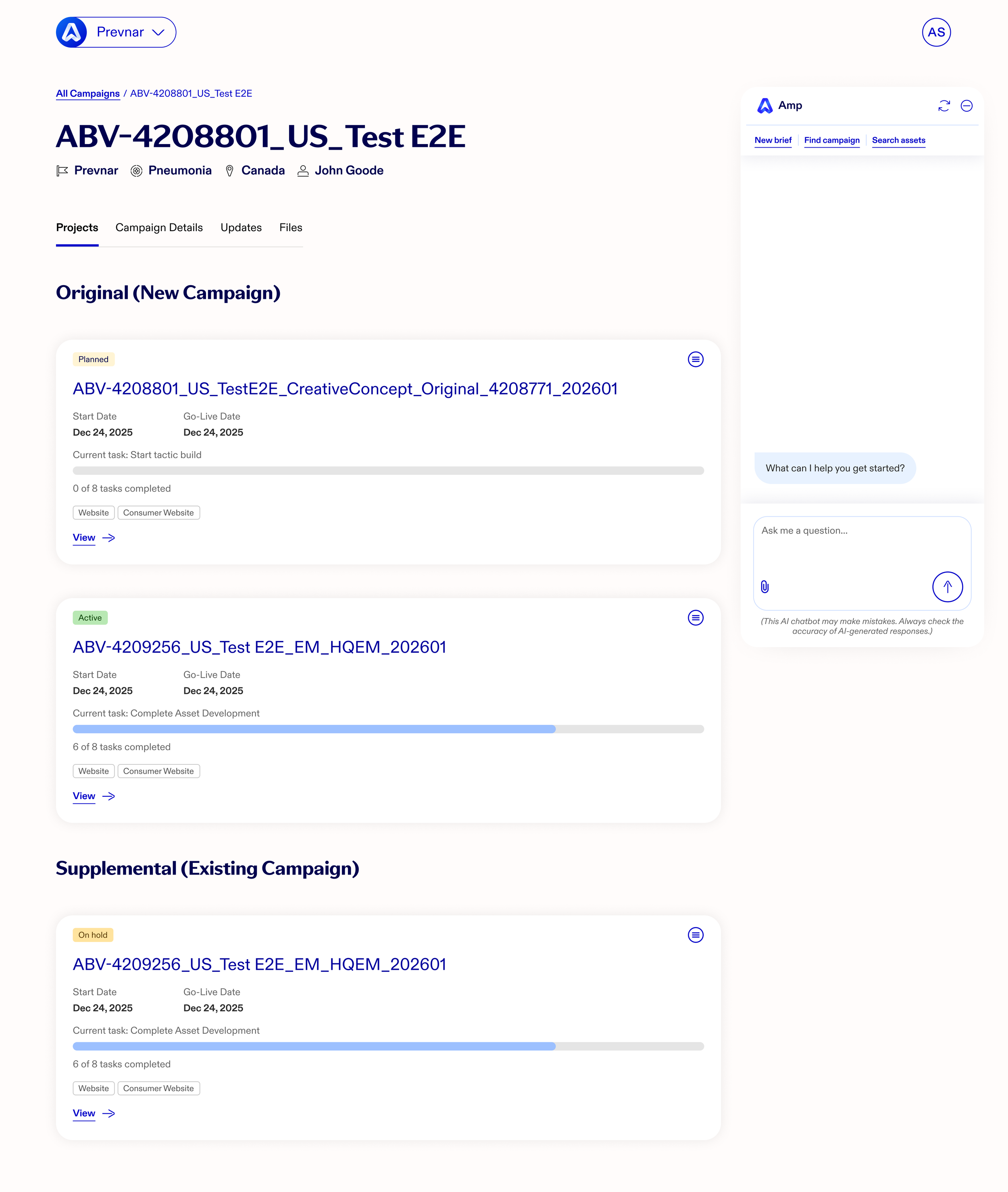
The high-fidelity phase translated the flows into a complete set of polished screens spanning onboarding, brief creation, proposal and creative review, and cross-market asset reuse. Each screen carried the canvas + chat model consistently, so a marketer moving between tasks never had to relearn how the product worked.
I built these designs on top of the client's existing enterprise design system to keep AMP visually consistent with the tools marketers already used. But an agentic, canvas-based product needed patterns their system didn't yet have. I identified and designed those net-new components as a set of tracked "outliers" — including the conversational UI itself, an onboarding progress bar, custom iconography, and a reworked primary navigation dropdown — so the team had a clear inventory of what extended beyond the established system and why.
UX Documentation
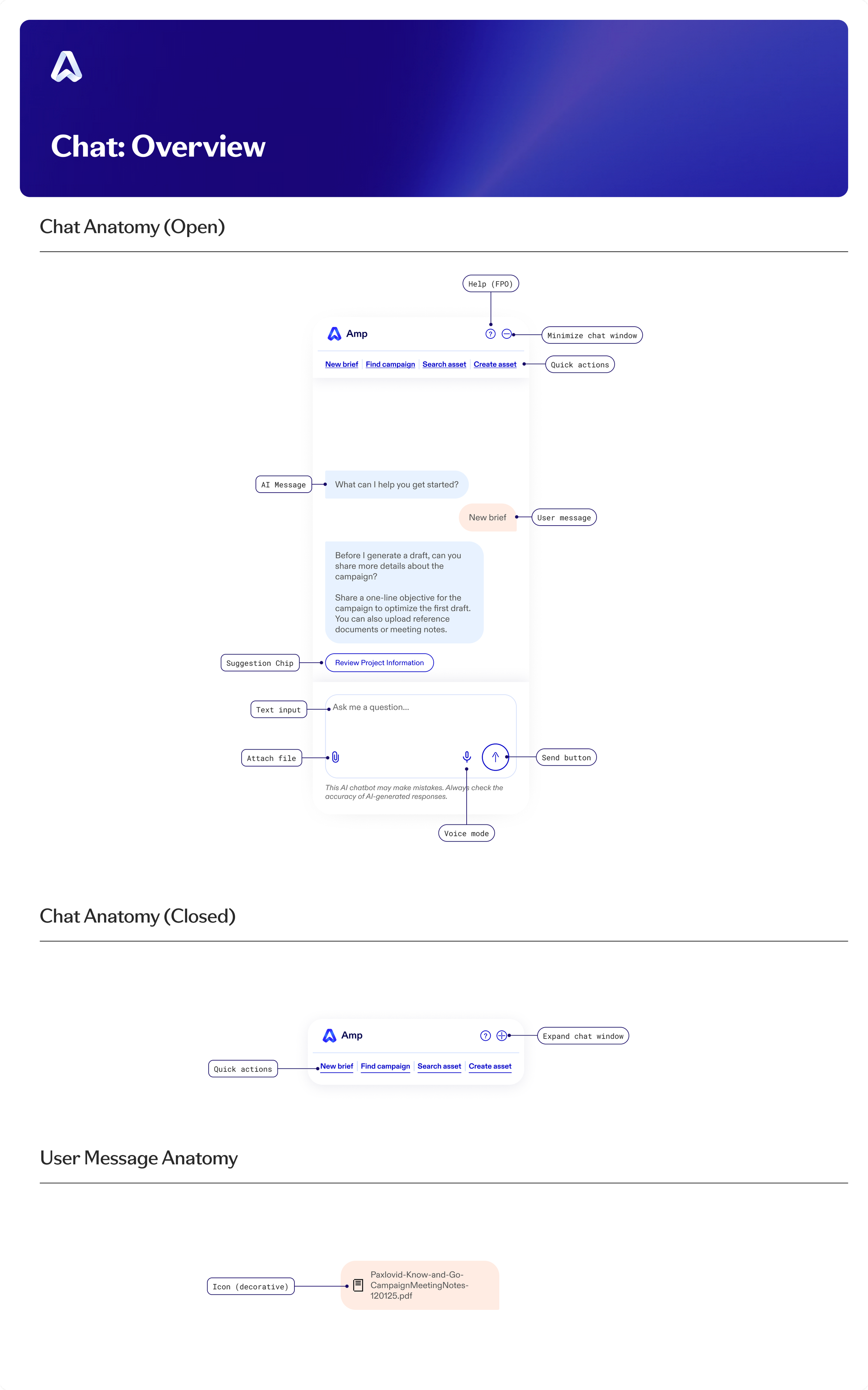
Because the conversational UI was the heart of the product and had no precedent in the client's design system, I documented it as a proper component spec so it could be built consistently and accessibly.
The documentation covered the chat's anatomy and its placement and layout with precise redlines — 348px wide in its default state, expanding to 451px in creative mode, with defined margins and behavior for each context. It specified interactive states for the send button, voice mode, and suggestion chips, and mapped the user flows the chat needed to support.
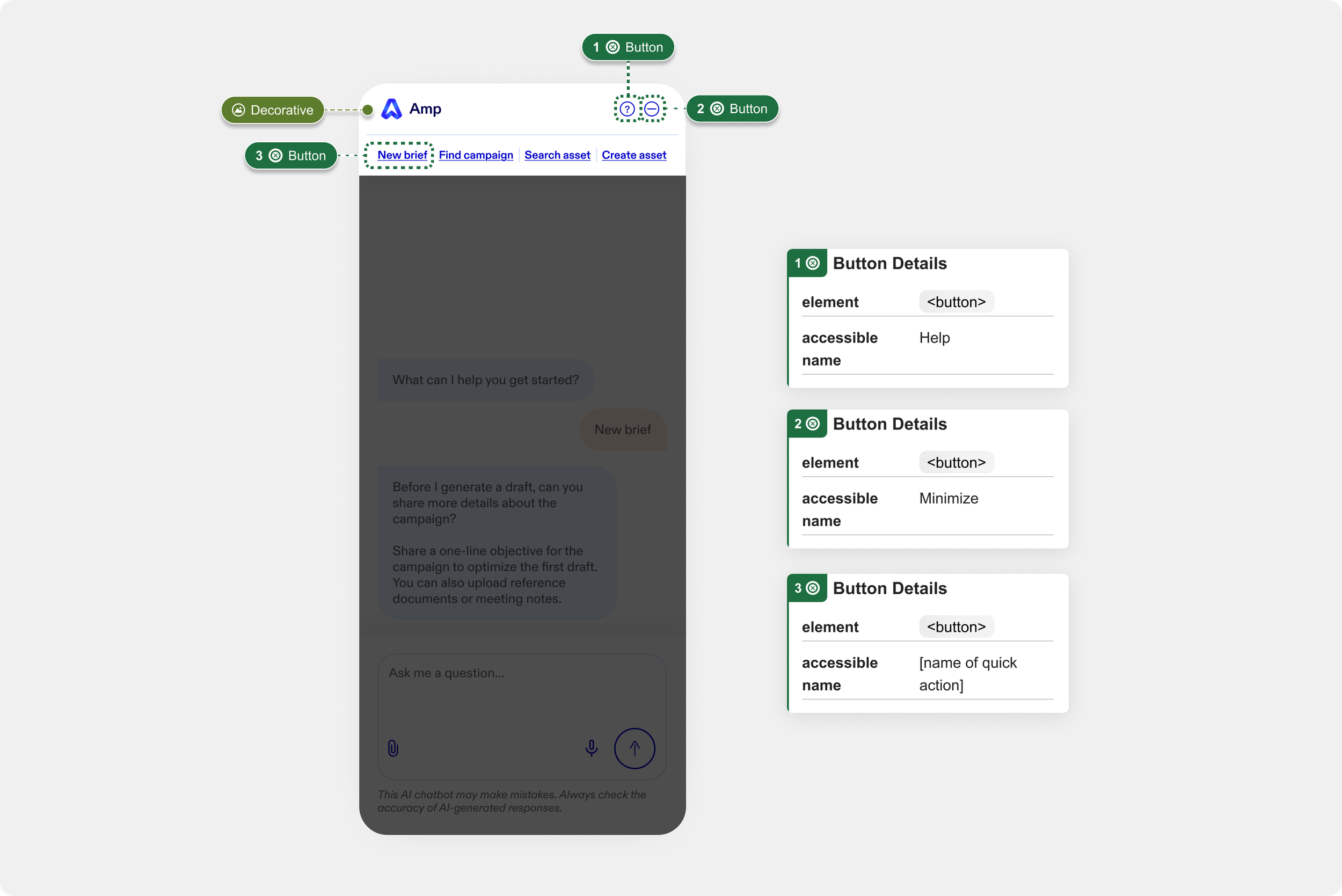
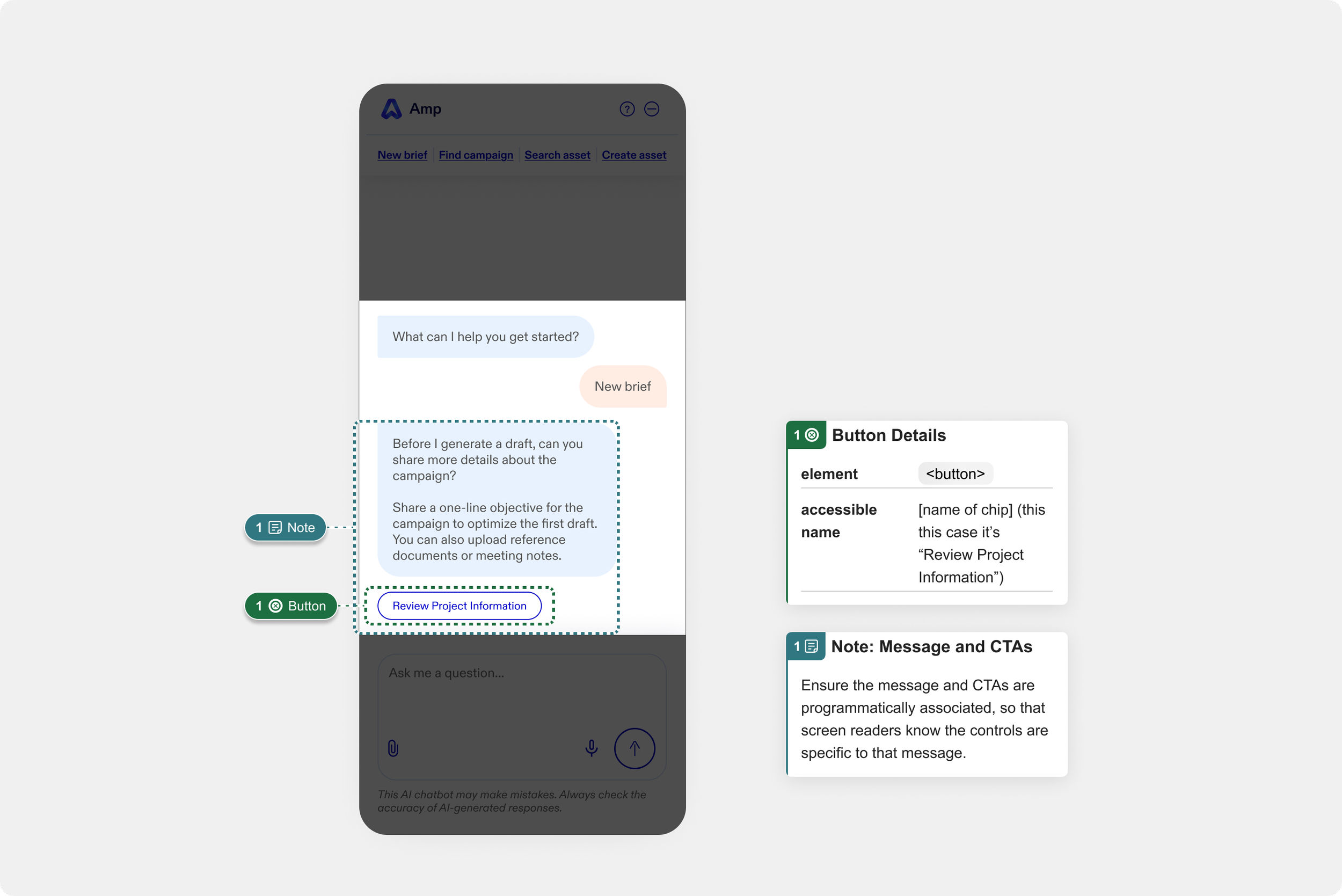
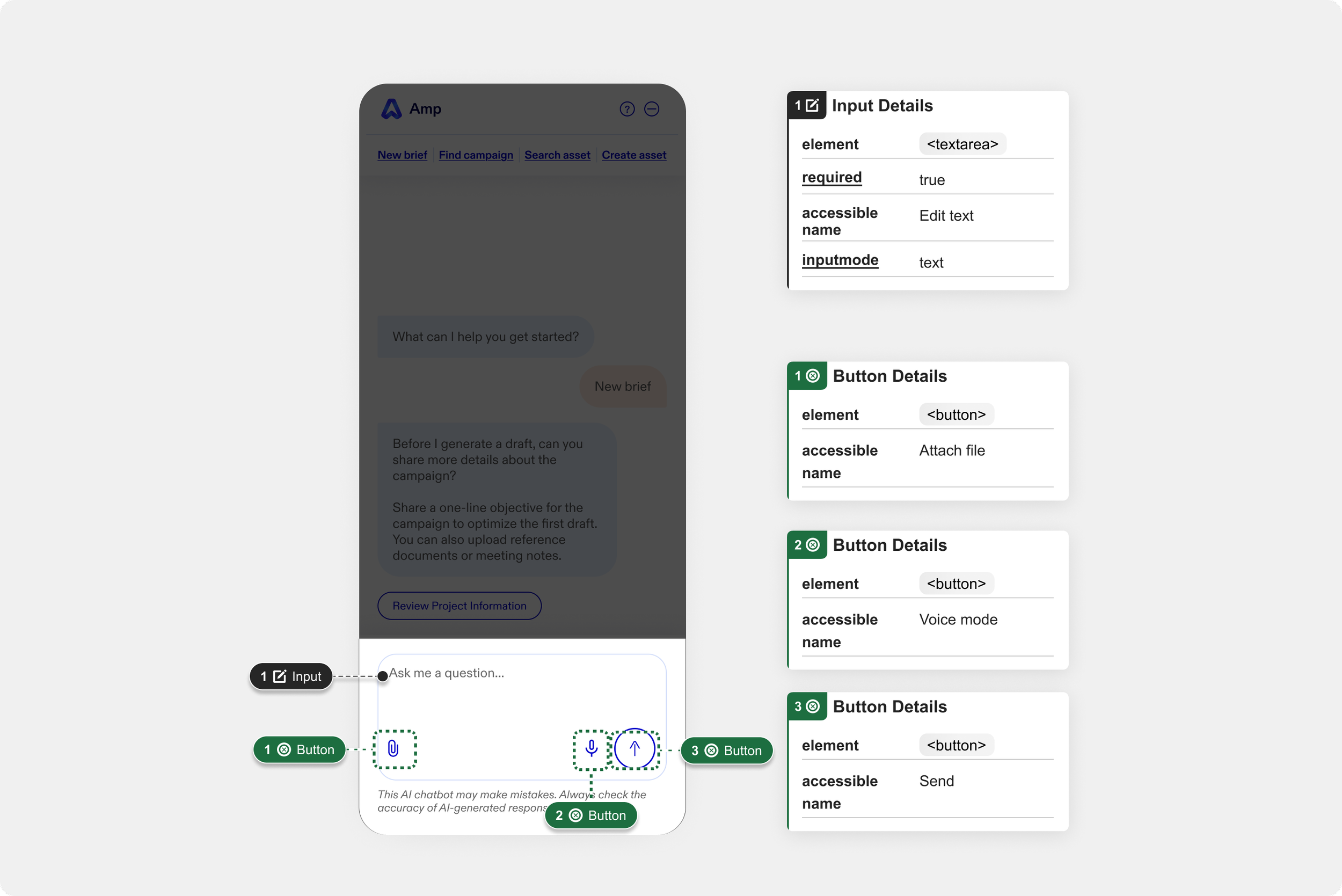
I paid particular attention to accessibility, annotating the conversational UI with focus order, landmark regions, reading order, and element-level detail so the experience would work for assistive technology from day one rather than being retrofitted later. For a net-new, AI-driven interface, getting this specified up front was what made it buildable.
Impact & Learnings
This was my first deep experience designing agentic AI UX — a fast-moving, largely undefined problem space with no established patterns to lean on. It pushed me to think from first principles about how people should interact with an AI that doesn't just answer questions but takes meaningful action on their behalf.
It also gave me a much deeper understanding of how large enterprise marketing teams actually operate: how content gets created, how approvals move and stall, and how much friction lives in the gaps between tools and stakeholders. Designing for a regulated industry meant every convenience had to be balanced against compliance and control.
Most of all, it sharpened my instinct for the central question of agentic design: how much should the agent do on its own, and how much should stay in the user's hands? Every flow in this product was, in some sense, an answer to that question.